
If you’ve ever had to open three tabs just to make a QR code, download a sketchy PNG, then fight with it inside your design… you already know the pain.
That’s why Day 3 of 12 Days of Light Lane is a new built-in QR code + barcode generator that drops straight into your workspace as a clean vector.
No external generators. No low-res downloads. No fiddly imports. Just generate, drop it in, and engrave.
Try it now with the free trial: Here
Why this matters for engraving
QR codes and barcodes look simple, but they’re one of the easiest ways to accidentally ruin a job:
- blurry PNGs that engrave soft and unreadable
- wrong sizing that breaks scan reliability
- logos placed badly and destroying contrast
- inconsistent line widths when scaling
Light Lane fixes the workflow by generating codes inside the app, and adding them to your canvas as vector graphics, so you keep crisp edges and predictable results.
What’s included in Day 3
QR codes with custom styles
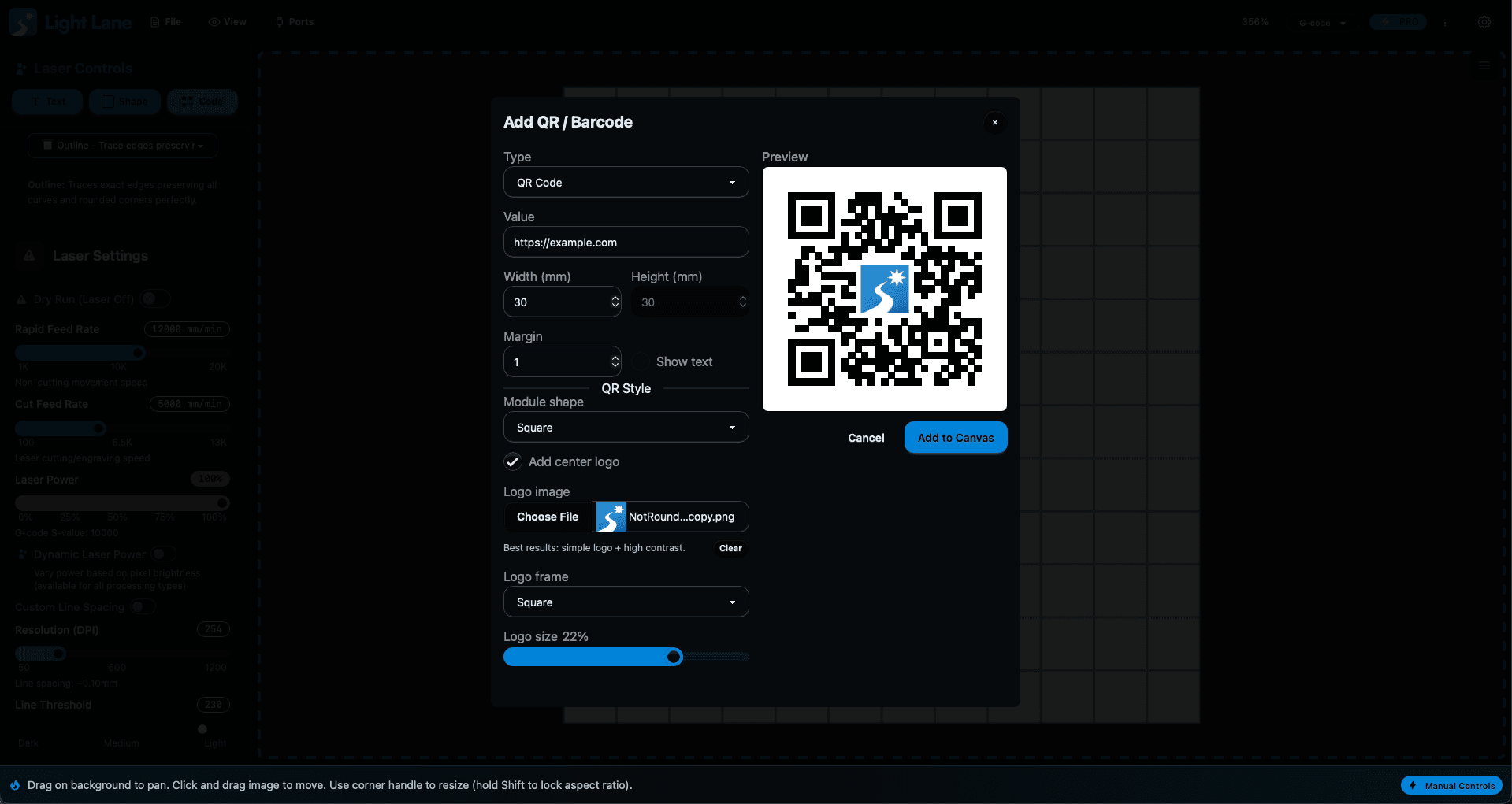
Generate QR codes with a bunch of design controls so they look good and scan reliably:
- Custom module shapes (rounded, dots, and more)
- Adjustable styling for a cleaner “brand” look
- Logo support with different frames to choose from
- Quick iteration without leaving your workflow
This is perfect for products where the QR is part of the design, not an afterthought.
Multiple barcode formats
Need classic barcodes instead of QR?
Light Lane now supports generating:
- Code 128
- Code 39
- EAN-13
- UPC-A
- ITF-14
They also drop into the canvas as vectors, so you can size them properly without quality loss.
The biggest win: it drops in as a vector
This is the part that matters.
When your QR code or barcode lands in Light Lane as a vector, you get:
- sharper engraving edges
- consistent line geometry
- better scaling
- cleaner output across different materials
It’s a small workflow change that prevents a lot of expensive mistakes.
Who this is for
This is useful if you engrave anything that needs:
- product authentication
- social links
- menu links
- serial numbers and tracking
- pet tags and ID tags
- packaging inserts
- maker marks / branding
Whether you’re running one laser in a garage or producing batches, this is the kind of tool that saves time every single week.
12 Days of Light Lane: what’s next
We’re shipping a new feature every day up to Christmas.
If you’re early, you’re not just watching updates, you can influence what ships next. If there’s a tool you want inside Light Lane, tell me and it might become one of the next days.
- Day 1: Template Editor
- Day 2: Image Editor for Raster Engraves
- Day 3: QR Code + Barcode Generator (Vector)
- Day 4: coming tomorrow
Start the free trial: Here
Follow the updates: Here
Try it now
If you want a faster workflow and cleaner scans, you’ll love this one.
Free trial: Here
Day 4 drops tomorrow.