
If you’ve ever been one millimetre off on a tag, plaque, coaster, or jigged setup, you know how painful layout can be.
Today’s update is about making placement feel properly professional.
Not “drag it until it looks right”.
Not “zoom in 800% and guess”.
Actual tools that let you place, nudge, align, and snap with confidence.
This is Day 7 of 12 Days of Light Lane. We’re shipping a meaningful feature every day through December 24.
What’s new
🧭 Precision rulers (mm)
Light Lane can now show rulers along the top and left edges of your workspace, in real-world units (mm).
That means you can instantly see:
- where an object is sitting on the bed (X/Y)
- how big it is at a glance
- how far it is from edges or the centre
Rulers are toggleable, so you can keep the workspace clean when you don’t need them.
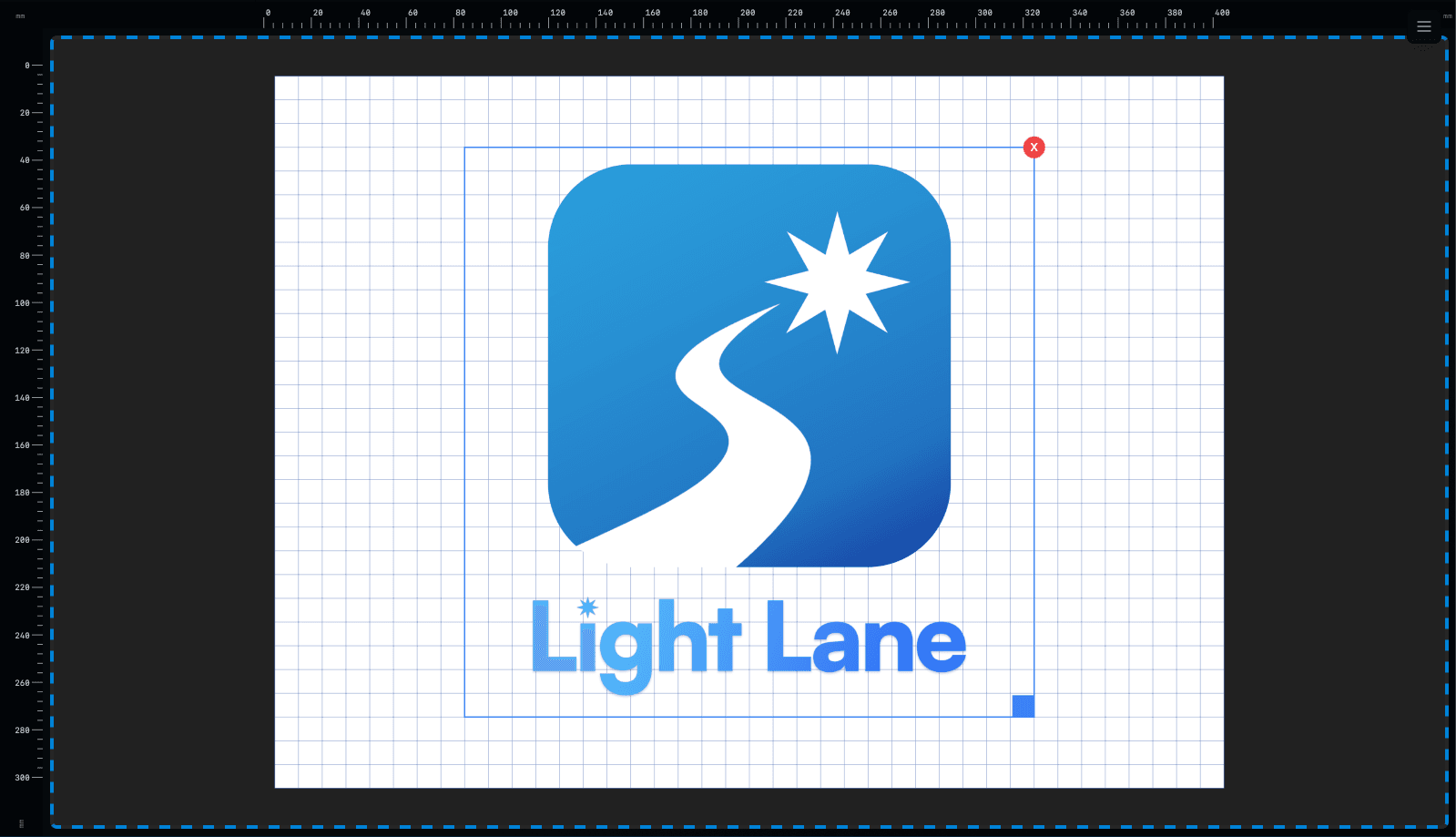
- Alt: “Rulers in mm shown on the top and left of the Light Lane canvas”
🔐 Snap system (simple, predictable, optional)
Snapping is one of those features that’s either helpful… or it drives you insane.
So we built a snap system that’s clean and predictable:
- Snap is OFF by default
- Snap to Grid
- Uses your existing canvas grid spacing (the grid square mm setting you already control)
- No second overlay grid
- Snap to Centre
- Align to the bed’s horizontal and vertical centre lines
- Snap to Edges / Corners (optional)
- For flush-to-edge work and corner pinning
- Hold Alt to temporarily disable snap
- Drag freely while holding Alt, then release to snap again
The goal: “snap when you want it, get out of the way when you don’t”
Snap only engages when you’re close to a target, and it releases naturally as you keep dragging, so it never feels sticky or locked.
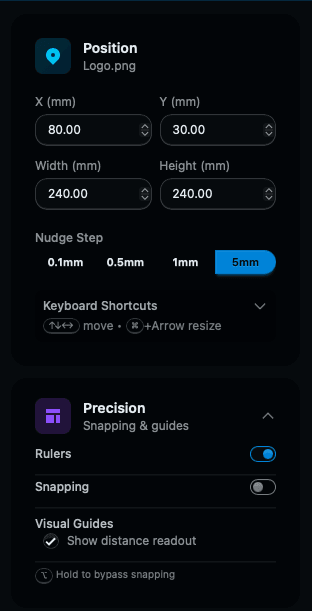
- Alt: “Snap settings in Light Lane: snap to grid, centre, and bed edges”
🎯 Keyboard nudge & resize (fast + precise)
Sometimes the mouse is just not enough.
You can now move and resize items using your keyboard, with a proper nudge workflow:
- Arrow keys: move by your chosen nudge step
- Shift + Arrow: 10× step (bigger jumps)
- Alt + Arrow: micro-moves (tiny adjustments)
- Cmd/Ctrl + Arrow: resize width/height by step
(Shift/Alt modifiers apply here too)
There’s also a Nudge Step selector in the UI so you can set a default (like 0.5mm or 1mm) depending on what you’re doing.
This is perfect for:
- aligning text to a margin
- placing artwork precisely on a jig
- fine-tuning layouts for batch runs
- correcting “just 1mm” mistakes without losing flow
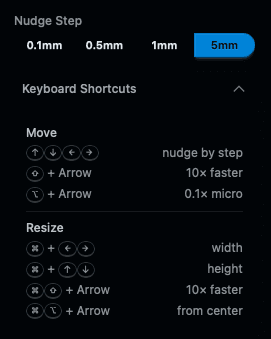
- Alt: “Nudge step selector in Light Lane for precise keyboard positioning”
🔢 Live X/Y readout while dragging
As you drag an item, a small tooltip shows your live X and Y coordinates.
This makes layout feel controlled:
- you always know where the item is
- you can match positions reliably across designs
- you spend less time zooming and guessing
⚡ Quick-position controls (instant)
If you want something top-left, dead-centre, or bottom-right, you should be able to do that instantly.
Light Lane has quick-position controls for common placements (corners + centre), and they now feel snappy and immediate, which keeps layout flowing fast.
Why this matters
Laser work is unforgiving.
If your layout is off:
- the engraving looks wrong
- jigs don’t line up
- batch runs become inconsistent
- you waste material
- you lose time (and money)
This update makes Light Lane feel like a modern design + control suite, not a clunky “drop file and hope” workflow.
With rulers, snapping, keyboard nudges, and live coordinates, you can:
- place designs faster
- be consistent across runs
- align work to real-world constraints
- make tiny corrections without breaking flow
And paired with recent drops like Step & Repeat, Material Test Grid, and our QR/Barcode generator, this is another step toward a faster day-to-day engraving workflow.
Try it today (free trial)
Light Lane is available with a free trial right now.
We’re still in early access, which means:
- features ship fast
- feedback actually matters
- you can influence what we build next
Holiday / founders pricing is currently live:
-
Hobby: USD $100
-
Pro: USD $200
-
Enterprise / education: custom (contact us)
-
Get Light Lane: https://lightlane.app
-
Follow 12 Days updates: https://lightlane.app/blog
If you try today’s build, tell us:
- what machine you’re running
- what you engrave most
- what feature would make Light Lane a no-brainer for you
What’s coming next
We’ve still got more drops coming before Christmas.
The goal isn’t just shipping features. It’s shipping the right features, quickly, and building the most modern laser workflow out there.
See you tomorrow.